Blog · November 21, 2026 · By the CreateOres team
How do I get more Google reviews for my small business?
Ask every customer right after the visit, with a short text or email that holds your Google review link. Make it one tap, ask everyone the same way, and never offer a discount or gift for a review, because Google forbids it.
Most customers are open to leaving a review. They need to be asked at the right moment, in a way that takes ten seconds. If you run the business from your phone between jobs, the asking is the part that slips. Here is how to do it well, what the rules say, and how AI can do the asking while you stay in charge.
Why don't happy customers leave reviews on their own?
Most are willing. They need an easy ask. In BrightLocal's 2026 survey of 1,002 U.S. adults, only 6% said they would not write a review, and 28% said they will always write one when asked, up from 16% in 2025. Asking is common too: 78% said a business asked them for a review in the past 12 months. So the ask matters, and an easy one matters most.
Read those numbers fairly. It is one online panel run through SurveyMonkey, and BrightLocal sells local marketing software. It covers all kinds of local businesses, not yours in particular.
When should you ask a customer for a review?
Soon after the job is done, while the visit is fresh. A good moment is the same day: after the haircut, once the repair is finished, after the meal is paid. Google suggests sharing your review link at the end of a chat with the customer. Send one request, and at most one gentle reminder a few days later.
Do not push people to write a review while they are still at your counter. Google's policy says businesses should not require or pressure customers to leave reviews on the premises.
What should a review request text say?
Keep it short enough to read on a lock screen:
- Who it is from. Your business name, first.
- A real thank you. Name the visit, so it does not read like a blast.
- An honest ask. Ask for an honest review, not a 5 star one. Google does not let you ask for specific content.
- One link. Your Google review link, so it is one tap.
- A way to stop. Reply STOP to opt out.
For example: "Hi Jordan, thanks for coming in to Maple Street Salon today. If you have a minute, we would love an honest review of your visit: [your link]. Reply STOP to opt out." Only text people who gave you their number and agreed to hear from you by text.
Is it legal to offer a discount for a Google review?
Do not do it. Google's rules forbid offering incentives, like free or discounted goods or services, for posting a review, changing one, or removing a negative one. That holds even if you only want honest reviews. Google can restrict a Business Profile that breaks its review policies.
The law adds its own line. In August 2024 the FTC finalized a rule that bans paying or rewarding people for reviews that express a particular sentiment, positive or negative, and bans fake reviews, including ones written by AI. The FTC can seek civil penalties against businesses that knowingly break it. The simple rule for your shop: no gifts, no discounts, no contests for reviews.
Can you ask only happy customers for reviews?
No. Google's policy does not let businesses discourage negative reviews or selectively ask happy customers. So skip the trick where a text asks "Were you happy?" and only sends the link to people who say yes. Ask everyone the same way. Google also notes that a mix of positive and negative feedback often feels more trustworthy.
How do you get your Google review link?
Open your Google Business Profile, choose Read reviews, then Get more reviews. Google gives you a link and a QR code. Copy the link into your text or email, and print the QR code for your counter or invoice. Customers need to be signed in to a Google account to post, and Google notes they can create one with a non Gmail email address.
Can AI ask customers for reviews for you?
Yes, and this is a good first job for AI because it repeats after every visit. It is one workflow: one trigger, one finished result.
- A visit is marked done. In your booking app, your calendar, or a job you close out.
- AI drafts the request. It uses your wording, the customer's first name, and your review link.
- You approve it. The draft waits on your phone. Tap Approve, edit it, or skip it.
- It is sent and logged. You can see who was asked and when, so nobody gets asked twice.
Requests only send without your tap if you give a written yes for that one task. Anything else waits for you.
How we set this up
We built this flow as our own test on November 21, 2026, using demo data: a made up salon and a made up customer. No real customer was texted. The two screens below are our test, captured as they appeared.
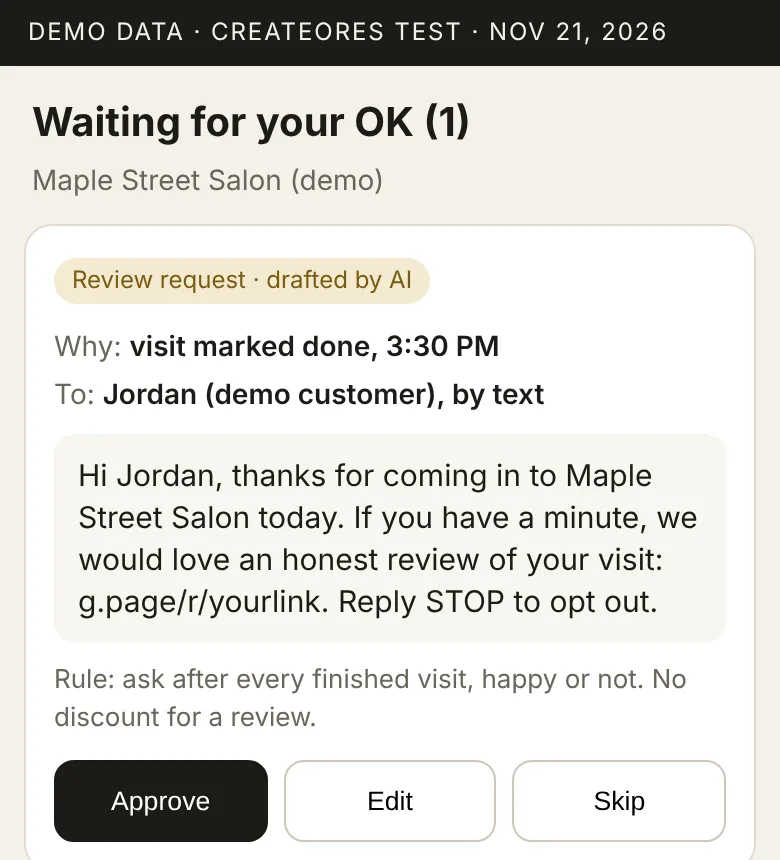
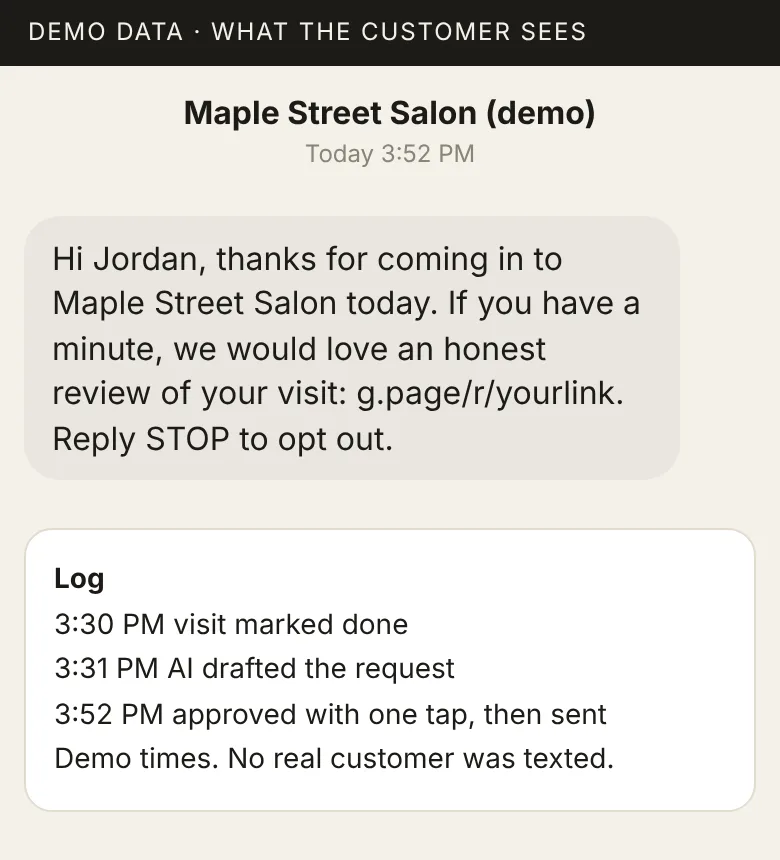
Notice the rule line on the first screen: ask after every finished visit, happy or not, and no discount for a review. We write that rule into the setup, so the AI never sends a gated ask or an offer.
What does a review request setup cost?
Review requests alone are one workflow, so they fit our Starter package: $1,000 setup, plus $110 a month for monitoring, fixes, and the 14 day check up. If you want requests, replies to new reviews, and appointment reminders together, that is three workflows, which fits Growth: from $2,500 setup, plus $150 a month. You pay your texting and AI providers directly, and we never mark those bills up. Setup takes about a week, live on day 7 once you approve everything. See every plan on our pricing section.
Once the reviews come in, read how AI can help you answer Google reviews. To get more people through the door first, read how to reduce no shows at appointments.
Frequently asked questions
What is the fastest way to get more Google reviews?
Ask every customer soon after the visit, with a short text or email that holds your Google review link. One tap to the review page makes it easy to say yes.
Is it illegal to offer a discount for a Google review?
Google forbids any incentive for posting a review, even for an honest one. The FTC rule from 2024 bans rewards tied to a positive or negative review. The safe rule: no gifts, no discounts, no contests for reviews.
Can I ask only my happy customers for reviews?
No. Google's policy does not let businesses selectively ask happy customers for reviews. Ask everyone the same way and reply to every review, good or bad.
How do I find my Google review link?
Open your Business Profile, choose Read reviews, then Get more reviews. Google gives you a link and a QR code to copy and share.
Can AI ask customers for reviews for me?
Yes. When a visit is marked done, AI can draft a short request with your review link. You approve it on your phone before it goes out, unless you give a written yes for that one task to send on its own.
Ask every customer, without the extra work
The first call is free. In 20 minutes we look at how you finish a job today and show you one sample workflow before you pay. No tech skills needed. Book a free 20 minute call, or email [email protected].
Sources
Opened and checked on November 21, 2026.
- Google Business Profile Help, Tips to get more reviews.
- Google Business Profile Help, Create a Google link or QR code to request reviews.
- Google Maps User Generated Content Policy Help, Prohibited and restricted content, fake and misleading content section.
- Federal Trade Commission, Final rule banning fake reviews and testimonials, press release, August 14, 2024.
- BrightLocal, Rosie Murphy, Local Consumer Review Survey 2026, published February 11, 2026, updated October 21, 2026. Panel of 1,002 U.S. adults via SurveyMonkey.
- CreateOres, Packages and answers, the prices and terms quoted in this post.
Written by the CreateOres team. We set up AI to automate repetitive or time consuming digital tasks for small businesses. Drafted with AI, checked and edited by the CreateOres team on November 21, 2026.